Comprehensive land plots management#
The comprehensive field management controls are located at the top of the Your Land Plots section and consist of 9 circular indicators showing the number of fields at different stages of cultivation.
- Allow you to manage all land plots in your account simultaneously.
- Suitable for accounts with a large number of houses.
- Selecting the circular icon applies the action to all areas of the selected stage, regardless of a house or a clone they belong to.
- Some stages consume resources — stamina, seeds, fertilizer, and gold. These resources are deducted from the currently active clone, which should have access to them.
Management of land plots of a certain house#
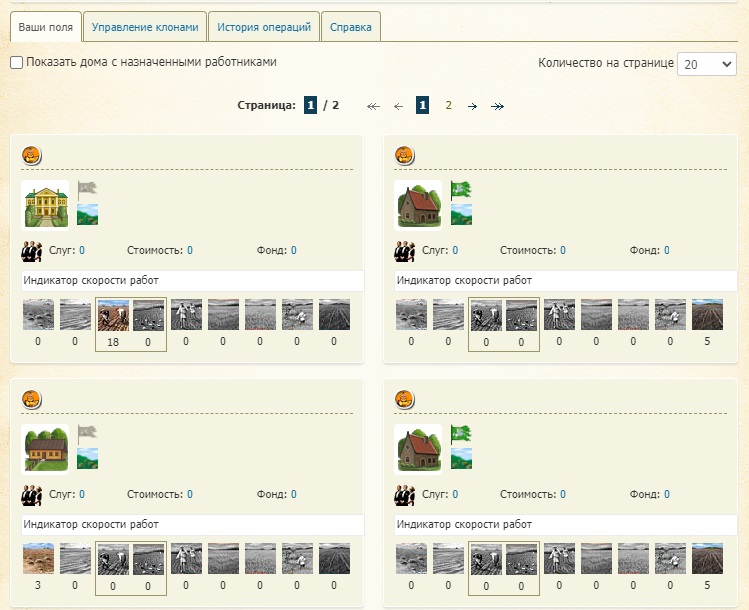
House-specific controls are located in the “Your Fields” subsection, under the comprehensive controls.
- They show a list of houses with the number of fields at different stages of processing.
- They allow you to fertilize, sow, harvest and reduce the duration of the “under fallow” stage.
- Control is carried out by selecting the square icon for the corresponding stage of the agricultural cycle in the desired house.
- The “Show houses with assigned workers” item displays only those houses where fields are involved in clone work.
- Resources (seeds, fertilizers, gold) are spent from the inventory of the active clone, even if the plot belongs to another clone.
Seed materials#
- The player independently chooses which crop and in what volume to grow.
- The balance of supply and demand influences price dynamics on the commodity exchange.
- To sow, it is necessary to purchase the appropriate seeds from the State Farm’s Biotechnology Department.
- Quick access to the section is available via the “Field ready for sowing” button in the control panel.
- Seeds can be purchased for any type of crop prepared for sowing.